
Early Access Mods (All EA Patron Tiers)
Added 2025-01-31 16:00:00 +0000 UTCMidnight/Azure Early Access Release
Active Therapy v1.2
Requires Lot's Core Library and Get to Work (EP01)
Small Business Activities function Requires Business and Hobbies
Custom Venue Activities function Requires Adventure Awaits
What this adds small business and custom venue activities pertaining to running a therapy practice or mental health center.
Small Business/Custom Venue Activities
The activities are as follows:
Tend Mental Health Office/Retreat Front Desk (someone MUST be assigned this task)
Conduct Mental Health Session
Participate in Mental Health Session
Setting up the Space
When setting up the business or therapy space, you should have separate offices for at least 2 mental health professionals. In the office should be at least one living chair or loveseat and a couch. You must designate one of the living chairs/loveseat/couch as Professional Seating for the Mental Health Professional. Do this in Live Mode by clicking on that piece of furniture.
When loading the lot, if playing the Small Business owner Therapist, do not direct them to do any tasks. They will find their seat and pull out their tablet to do work while they wait for patients all on their own.
For Reception desk there should be one The FRONT Desk and a computer on that desk. For small businesses, that should be the only computer on the lot unless you want the receptionist to constantly change computers.
The simpler your setup is the better for the small business. You don't need to put things in for your sims to do while they wait, etc. They will automatically attempt to sit down after checking in and occupy themselves on their own either with a book or their phone or by knitting.
Sims who conduct Mental Health Sessions should NOT be the same Sims who Tend the Reception Desk.
How It Works
Sims will automatically check in with reception but you can also manually check them in at the desk or with the receptionist. At this time, player sims can choose between an individual or group therapy session or a psychiatric session. NPC visitors will generally choose individual but if they meet the criteria can sometimes choose psychiatric sessions. Once checked in, Sims will wait until a mental health professional is available for the session and then autonomously start a session with a professional. Player sims can wait for this to happen or click on the furniture they want to sit at and start a session with the professional they choose who is available. Sessions are between 30 and 60 minutes.
If you a playing the Mental Health professional, you have the option to click on a sofa or couch in the office and Start a Session with the sims you choose. You can choose to start an Individual, Group, or Psychiatric Session, if Sims are available on the lot who meet those criteria. For Group and Family sessions, you can only choose up to 3 sims because that's all who will sit on the couch if you click on the furniture. You can choose more than 3 by clicking on the ground near the office or space where you want to hold the session. When conducting a session, it will happen autonomously without your input, but if you want, you can direct the conversation as desired by clicking on a sim and choosing a social under the Mental Health Session menu.
Mental Health Retreat - Custom Venue Schedule Preset
The preset currently comes with three preset assignments.
Mental Health Retreat Guests
Mental Health Retreat Staff
Mental Health Professionals
The preset schedule includes sleep, free time, breakfast and dinner, as well as prescheduled therapy sessions. The currently scheduled sessions are automatically individual sessions but like with small businesses, you can choose to start a Group Session as a Guest or as a Mental Health Professional by clicking on the ground or the furniture you want the sims to sit at. When clicking on furniture, you can only choose up to 3 sims to sit on a couch.
SimFinancial
Patron Early Access Version v1.5
This mod started out as a patron asking me to create financial reversals of fortunes for sims a la calamitous sims but with financial consequences because we agree it's too easy to accumulate wealth in the game. But then I wanted to have ways for them to mitigate those disasters. Maybe they needed roof repairs due to some unexpected storm damage. Could maybe home insurance cover a portion of that after their deductible? The answer to all of that was the creation of this mod and of SimFinancial Credit Union.
This mod is somewhat modular so if you only want one part of the mod you can pick and choose what you'd like in terms of including Financial Events, Insurance, or Loans. The base mod is required for all Credit Union services (including loans, investments, credit cards, and insurance) therefore Credit Scores, Credit Union accounts, and Income Taxes are part of the base mod. You do not have to need to keep a large amount of funds in the account, but being a member of the SimFinancial Credit Union is required to utilize its services.
The credit union aspect was created and is intended to be a simple banking experience to facilitate other aspects of the mod. It can be used independently of those features, however, and that's why Loans, Financial Events, and Insurance are separated but it is not the major focus of this mod since there are other more comprehensive mods for that. But I needed somewhere that would house those typical banking services and thus the credit union was created and there's no point in having one without bank accounts.
Core Mod Features
Credit Scores
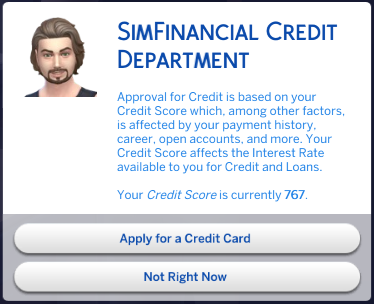
Every Sims is assigned a credit score. The Credit Score is based upon factors such as income, career levels, marital status, open accounts, if bills are paid, late payments, defaulted or charged off accounts, on time payments, cash, property values, and more. Your Credit Score is not static. If your Sims lose their job or opens a new account or fails to make a payment a the credit score is affected. Every time they apply for a new credit card, loan, or insurance, the credit score is run and it can vary.
Income Taxes
No longer will sims not pay income taxes! Your sims will be taxed biweekly based on the personal income levels based on a week's average salary of their chosen profession for all regular game careers. For freelance careers and gig workers and custom careers those income levels are based on the average of similar regular careers. Taxes are higher for sims in higher career levels and with more lucrative and prestigious professions and lower for part time workers and lower paying jobs. If your sim is married, they will be taxed jointly with slightly favorable tax rates. There is also a slight tax break for Sims with dependents.
Credit Union Accounts
Opening an Account
The mod can be accessed for the first time via the Household menu on the phone as "Open a SimFinancial Credit Union Account." Once an account has been opened the menu can be accessed via the Household phone menu or by clicking on your Sim.
Being able to access the mod via the Sim is helpful in case your phone has been shut off or broken (see Unexpected Expenses) and you need a quick credit card cash advance or a loan to get it back up a running.
Checking and Savings Accounts
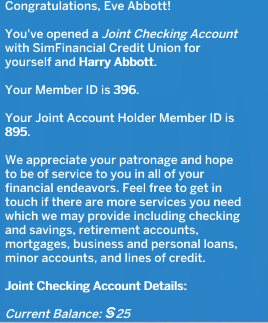
Your sims will need to open a Joint or Personal Checking with SimFinancial Credit Union in order to access savings accounts, retirement accounts, insurance, credit cards, or investment options through the Credit Union. Opening an Account requires a 25 dollar deposit. Sims can choose to have automated transfers from other accounts to their checking accounts and from their daily paychecks into their checking accounts.
Joint Accounts are between two sims in a relationship whether dating, engaged, or married. If sims with a Joint Checking Account break up or divorce then their Joint Checking and Savings accounts are equally dispersed into separate Personal Checking and Savings Accounts.
You do not need to place large sums in these accounts but they are required to be opened. With their Checking Account they have access to all other services. When a sim with an open account dies, their account contents are transferred either to their remaining spouse's accounts, if available, or to the household funds, if not.
Minor Accounts
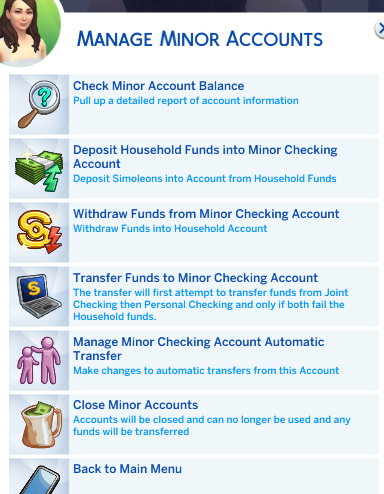
Once your sim open an account, they are also able to open Minor Checking and Savings Accounts for their children, infant and up. Both parents have access to minor accounts. They can setup automatic deposits from the household funds to their children's savings accounts. They can also setup automatic deposits into the Minor Checking account as a weekly allowance. When Teens age up their Minor Accounts are transferred into Personal Checking and Savings accounts.
Business Account
If a Sim owns a business (small business or retail or landlord) they can open a Business Account. To transfer funds from your Sim's small business/retail business/vet lot to the Business Account they must be physically on the lot. If they want to transfer funds from their Business Account to their small business/retail/vet funds they must also be on the business' lot and if a small business, it must be opened. These are game limitations. Transfers between the Business Account and other owned accounts can happen on any lot.
Retirement Accounts
Your Sims can open a separate Retirement Savings Account. This is available for Young Adults to Elders. This is an interest bearing account. The earlier you open a Retirement Account in life the better your interest rate. You can setup automatic deposits to your Retirement Account to facilitate easier saving. When your sim retires or if they are already retired, they can access the funds in the account.
Credit Union Services
Credit Cards
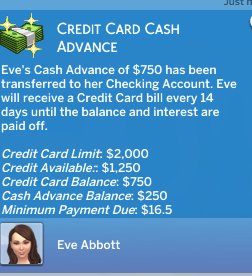
Credit Cards are very simple. You can open one, get a credit credit card, and have a credit limit. The Credit Card simply facilitates the borrowing of some fast, smaller amounts of cash. You can get a cash advance from your credit card which has a daily cash advance limit. This will reset up to your credit limit. Then you will be billed every two weeks for your credit card balance. The payment will be taken from either your Personal or Joint Checking. If you miss payments you will be charged late fees. If after three missed payments you still have not paid your past due balance your account will be charged off. You can choose to pay the balance at any time.
Investment Portfolio
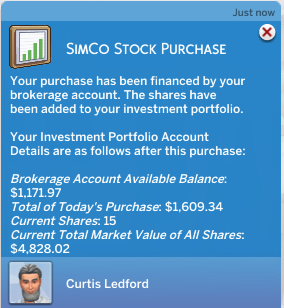
Sims can now invest in the fickle stock market. Open a Brokerage Account and start buying and selling shares of SimCo stock. The current market value of the shares changes based on current market conditions at the time of the sale or purchase. While they do not fluctuate daily, market conditions shift over time and what you value of your shares can remain stable, go down, or go up. Keep an eye on the markets for the best time to sell and make a profit! Funds from your Brokerage Account can be transferred to your Checking Account or Household funds. But in order to buy or sell shares your Brokerage Account must be funded.
Modular Components
Financial Events
Your sims can have the chance to have an unexpected expense.
Expansion Pack Notes
If you have an Expansion pack that allows for a practical consequence it will occur. For instance, if you have Eco Living and there's a water leak, your water heater can be broken or if you have For Rent, a mold infestation can produce actual mold.
Financial Event Types and Consequences
Positive Financial Events
They can have a smaller, less common chance of inheriting some money, settlement money from a class action consumer lawsuit, a bonus at work, a tax rebate, and receiving cash from relatives as presents during life events (aging up, getting married, etc).
Negative Financial Events
Some possible negative financial events or unexpected expenses can include (but are not limited to so prepare for a few surprises):
Your landlord deciding to institute pet rent
An electrical outage causing you to lose power until you pay the electrician's bill
Your phone breaking suddenly so that you are unable to use your phone
A sudden spawning of mold around the house that requires fumigation. Pay to get it removed because it can't be removed until you do- not even by magic!
Moving expenses when moving in and out of your sim's homes
Pest Infestation with pests crawling around. You can't even stomp on them!
Speeding or Parking tickets
Engine Failure
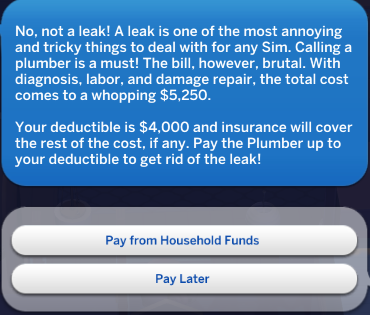
Water Leak with water everywhere, plumbing fixtures broken, and water heater broken until the plumber is paid
A random unpaid vet bill from months ago you forgot to pay
A trip to urgent care that resulted in an unpaid medical bill
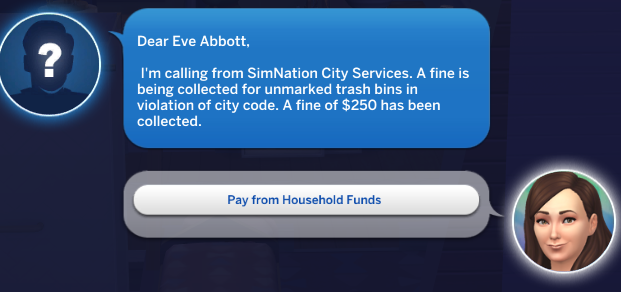
The HOA charging a fine for a supposed association violation
and more!
Each financial event will cost your sim an amount from a small fine of maybe $250 to fairly substantial and varied amounts of simoleons up to $25,000.
Mitigation Options
To mitigate some of these financial issues sims can buy insurance and/or take out a loan to cover the expenses. See below.
Insurance
Sims can purchase insurance to help cover some of the costs of those unexpected financial events.
Types of Insurance
Sims can purchase the following types of insurance:
Auto Insurance
Some financial events are travel/vehicle related. Integrated with SimNation Travel.
Homeowner's Insurance
Sim must own a residential, tiny residential, or haunted residential lot
Life Insurance
This is a separate policy from Golden Years
Medical Insurance
This is only available to Sims who have opted out of HCR insurance options or who do not have Healthcare Redux installed
Renter's Insurance
Sims cannot own a residential lot so an apartment or residential rental tenant
Pet Insurance Rider
For sims with cats and dogs who have Renter's or Homeowner's insurance you can purchase a Pet Insurance Rider to cover pet vet expenses from both the mod and actual visits to the Vet lot
Insurance Quotes
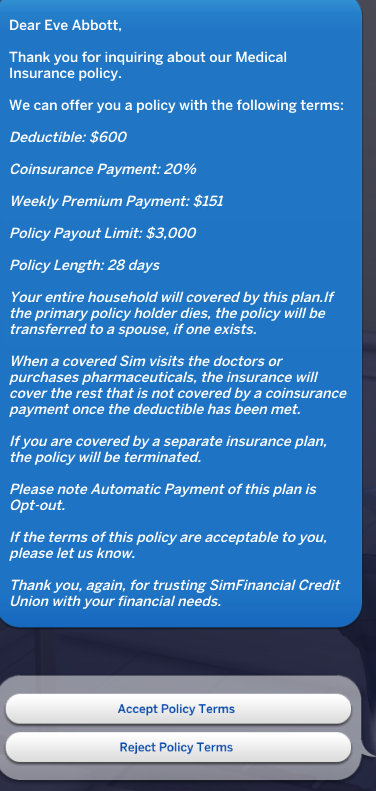
To get started, the Sim has to request an insurance quote. An insurance agent will get back to them with the terms of the insurance policy they qualify for based on the credit score, their risk factors (for instance, for medical insurance if they have preexisting conditions, life insurance the age they're applying at, for auto insurance the type of vehicle they're insuring, and for home/renter the type of dwelling they live in and the property values) and the type of insurance they requested. Sims can either accept the insurance policy terms and start their insurance or reject the policy terms. They can apply again but may not get the same terms.
Each insurance has a policy limit, premiums that must be paid weekly, and a deductible to be met before insurance pays (excluding Life). A sim's Credit Score as well as the type of insurance (Basic, Standard, Premium) determines the policy's limit, premiums, and deductible.
How Insurance Works
Life and Auto Insurance are only apply to the Sim who opened the insurance. Homeowners, Renters, and Medical Insurance applies to the entire household. However, only the Primary policyholder (the sim who opened the account) can make policy changes. When the Primary policyholder dies, their spouse, if one exists, will be designated the Primary. Otherwise, if there is no spouse the insurance policy will be terminated for all others in the household and another adult will have to open a new policy of their own.
Property Insurance
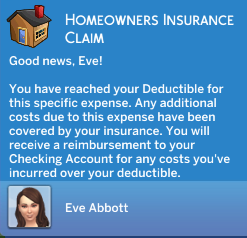
For property insurance (Auto, Homeowners, Rental) when your sim has an expense covered under their policy, they will be notified if insurance has covered a portion of their cost. So if a sink breaks and the sim wishes to repair or replace that sink, if the cost to do so is more than their deductible than insurance will cover the rest and the sim will only need to pay for the portion not met by the deductible. The deductible does not accumulate. Each covered expenses is calculated individually to see if it meets the deductible. For instance if you repair 7 sinks they are seen as 7 separate expenses incurred and 7 separate times your sim would need to meet their deductible before insurance kicked in.
Medical Insurance
For Medical Insurance, this is different. Your sim will accumulate expenses up to their total deductible. So if a doctor visit is 20 dollars then that counts towards a larger deductible as opposed to their needing to meet the deductible each instance. Once your sim reaches their total deductible for Medical Insurance, they will then only be expected to pay a 20% coinsurance for 10 days. After 10 days, their total deductible resets and they will have to accumulate a total expenses equal to or exceeding their deductible in order for the deductible grace period to restart.
Life Insurance
Life Insurance policy limit is the maximum payout amount their beneficiaries can receive. A sim's spouse is automatically made the default beneficiary but this can be changed at any time. They can name up to four different beneficiaries of the life insurance policy. The Life Insurance policy earns interest as they pay premiums over time. When the Life Insurance policyholder dies, the policy will kick in and beneficiaries will be notified they can submit a claim to receive those death benefits. The inheritance is divided equally amongst beneficiaries.
Billing and Policy Renewal
The policy lasts for 28 days and autorenews. When the policy autorenews, the total deductible for Medical Insurance resets, the policy utilization resets, and any late payments from the previous iteration of the policy are reset.
Insurance Premiums are due weekly. If a Sim misses a payment they are charged a late fee and the past due amount is added to the amount of the next bill. After 2 missed payments, the insurance policy lapses and no expenses will be covered until the account is made current. After 3 missed payments, the insurance policy is cancelled.
Loans
Sims can apply for three different types of loans.
Types of Loans
Business Loans
Can be opened by Business owners
Mortgage Loans
Can be opened by all adult Sims. They can be applied for separately or with a spouse. The credit score of both spouses will determine the loan terms.
Personal Loans
Can be opened by all adult Sims.
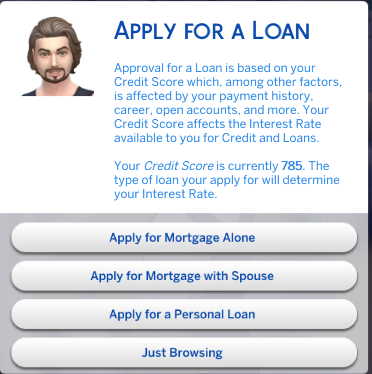
Loan Applications
Personal Loans have slightly higher interest rates and smaller available loan amounts. Business and Mortgage loans have slightly average to lower interest rates and large available loan amounts.
You can choose your desired loan amount and a loan officer will inform you if your loan has been denied or approved and the terms under which it is approved such as interest rate, minimum payment, and installments. For mortgages, your sim's are required to make a downpayment. You can reject the loan terms or accept them. The funds will be distributed into your sim's checking accounts.
How Loans Work
Payments will be billed on a weekly basis for the duration of the loan's installments. Missed payments will receive late fees. After 2 missed payments, the loans will be placed in Delinquent status. After 3 missed payments, the loans will be considered Defaulted and closed. Your sim will have a harder time getting a loan in the future if Defaults exist on their credit history.
Comments
Hi, I messaged you on discord for mod help. Having issues with the newest versions and old version
Deljanae Robinson
2024-06-16 19:13:58 +0000 UTCThis has been updated in the post patch version.
adeepindigo
2024-03-01 23:19:37 +0000 UTCThere is no physical medication. When your sim goes to the doctor, the notification states that the doctor has given them a dose in the office which will then help it to go away sooner.
adeepindigo
2024-03-01 23:19:17 +0000 UTCLove your work..I'm needing some assistance with the cruise option. When I select for sims to go I typically choose 3 days, but the prompt will then say my sims has a 5 day cruise..when they leave there's no way for me to get them back and it's been over 3 days. Am I doing something wrong?
Chenille Powell-Joyner
2024-02-27 14:43:32 +0000 UTCheyy, my sims was diagnosed with a yeast infection through the gynecologist but the medication to clear it wasnt available to buy. will it go away on its own?
bubbles97
2024-02-09 10:16:15 +0000 UTCHey, hope all is well. I have a question: Since life insurance Is now under the golden years mod, does that mean younger people can't sign up for life insurance?
Sonotemo
2024-02-09 04:32:07 +0000 UTCNever mind, was just me being dumb, didn't realise you had to do it from the infant and couldnt do it from the adult sim
Neve Terblanche
2024-02-03 18:37:39 +0000 UTCheyyy, I'm struggling to get my infants and toddlers to be able to go to the doctor or psychiatrist, the option isn't available when I click on them
Neve Terblanche
2024-02-03 17:02:48 +0000 UTC🤦🏽♀️🤦🏽♀️🤦🏽♀️
Tanisha Williams
2024-02-03 15:31:29 +0000 UTConly if you pay the 9.50 tier
Mileena Jayne
2024-02-03 12:41:34 +0000 UTCRPO is not my mod.
adeepindigo
2024-02-03 05:07:10 +0000 UTCMy sim has been having nothing but baby boys..then she couldn’t get pregnant anymore so I had her do IVF. But this got me to thinking, what if you could choose the gender of the baby in IVF (not ICI OR IUI)? and what if a sim could choose how many embryos to have transfer?
Tanisha Williams
2024-02-03 01:42:29 +0000 UTCsame
Christie Sons
2024-02-02 19:49:36 +0000 UTCI just came to check lol
Ruth Elizabeth
2024-02-02 16:18:35 +0000 UTCIs connected sims being released today?
Brandmuffin89
2024-02-02 15:13:39 +0000 UTCI have been playing with the elder mod a lot. I could cry with how wonderful you made this life stage. Thank you SOOOOO much!!!!!
Sam D.
2024-02-01 12:45:30 +0000 UTCI thought I was crazy for having this issue. I just went into cheats and disabled menopause for the sim since I figured I was probably the one doing something wrong.
Toni Hawthorne
2024-01-31 00:57:36 +0000 UTCHey there! For the elder mod I am able to initiate booking the cruise but the prompt for 2 days later states to get to the port but when I click on the Senior Activities to travel for the cruise the option isnt there. I also tried using the phone menu as well as clicking outside of the house. Is there something Im not doing right ? :-)
Lilmiznormal
2024-01-25 01:26:32 +0000 UTCThank you so much for your work! Maybe I'm blind, but: Is there any chance to change the settings for the HealthcareRedux-Mod? My female sims get into menopause as soon as they start aging up from young adult to adult - although they still have 40 days until the become an elder.
yaro
2024-01-24 18:50:57 +0000 UTCDoes anybody know what is required for the dental mod to work? It says base game, general pie menu, mood pack, etc. I have everything listed, but I still cannot make a dentist appointment,
Brandi Pankey
2024-01-24 00:41:08 +0000 UTCi get Critical error on both mods and some other mods you have. dont know why
Ragnhild Skogaker Røyseng
2024-01-22 20:53:25 +0000 UTCHow can you access the treatment center option for divergent sims? I'm having trouble finding it.
Caiden Nimchuk
2024-01-19 04:16:46 +0000 UTCI have tested the mod by itself with the required mods listed in the notes I still do not have the option to drop the elder off.
Harley Quinn
2024-01-15 08:35:45 +0000 UTCMy elder sim was approved for the Twin Brooks home and I paid the deposit. I got the notification that an adult sim would have to drop her off and the option is in the phone but I was unable to find the option in the phone. I went through the elders phone and the adult phone. Can someone show me or tell me what I’m looking for or how to do it?
Harley Quinn
2024-01-15 07:06:00 +0000 UTCI can't seem to get the mod to work or show up at all. I've cleared my localcache and everything. I don't know what to do
CocoBear
2024-01-14 02:59:29 +0000 UTCI had the same issue but she said there was a part in the options you just remove that file before you install the download, it worked. I’d remove the mod and before installing check for that option file that prevents death and delete it from the download
motherofpuppies
2024-01-10 13:35:54 +0000 UTCThere’s a part you download like an option part, it’s part of the whole pack you download that prevents death you just remove that option before you install it
motherofpuppies
2024-01-10 13:33:04 +0000 UTCI guess I explained it poorly. I have an elderly couple and I set up their policies to be paid out to their daughter and the remaining spouse - both whom live in the household. When I set up the first parent's policy, I accidentally queued the select beneficiaries action twice as described above. As a result, I only received a notification saying that the spouse was named as a beneficiary but not the daughter. This was my first time purchasing a policy so I didn't think anything of it. When I purchased a policy for the second parent, I received a notification for both the spouse and the child. I went back to verify that the first parent's policy was to pay out to both the spouse and the daughter via the "Remove Beneficiaries" menu option. However, this menu did not actually give me the ability to remove any sims. It only populated a list of all the sims who were not in the household. When I filtered this list by household, none of my sims in the household popped up so I assumed that they were not beneficiaries to the policy. So, a better question would be...is there a way to add a menu option to where you can view the current beneficiaries to a policy as a way to verify that things were set up correctly? Because unless I'm missing something, the only options I see after purchasing a policy is to remove beneficiaries.
daluved1
2024-01-10 00:21:29 +0000 UTC... I don't get your question, sorry. If your sim didn't have any beneficiaries to remove, the option to remove them wouldn't be possible. What's the issue? You want to remove them, then do so. You want to keep them, then do so. You can tell who you made a beneficiary by who you're able to remove. If your sim can pick no other beneficiaries, that's because no one else is available and they've already chosen all the ones eligible. I'm not sure why you'd assume something was wrong for not getting a confirmation for an interaction you cancelled... that's like saying you're confused you didn't get a receipt for something you put back at the store.
adeepindigo
2024-01-08 12:40:59 +0000 UTCMy apologies if this is not the appropriate place to put this, but I am having an issue with the Golden Years mod. I accidentally set no beneficiaries for my sim's life insurance policy. I didn't realize the selection screen would automatically queue after purchasing, so I had manually queued a duplicate select beneficiaries action myself on accident. I selected the beneficiaries the first time the screen popped up but then simply x'd out the selection screen the second time (without selecting any sims). This apparently cleared my original beneficiaries leaving the sim with a policy that will (I assume) pay out to no one. I made this assumption because I did not get a confirmation saying "so and so is a beneficiary" like I did with other sims who purchased policies. Is there a way to cancel/reset a sim's life insurances policy or is it possible to add a menu option where you can add beneficiaries after the fact? The only current option is to remove beneficiaries.
daluved1
2024-01-08 02:27:33 +0000 UTCOh good gravy this is exactly what I'm talking about. https://imgur.com/a/sbPz2Is
Danielle
2024-01-07 21:27:34 +0000 UTCI have been having this issue a lot lately, one of my sims died from postpartum bleeding, it said they could not be saved but then my sim didn't end up dying??
Amie🫶🏻
2024-01-07 19:47:39 +0000 UTCDid you find a way to stop it or do you still have it happening? Happened again today 🤣
Samantha
2024-01-07 18:30:58 +0000 UTCYes, this has happened to me!
Des
2024-01-07 17:52:41 +0000 UTCHas anyone had this with healthcare redux.. my sim had a heart attack and it said he couldn’t be saved and he had died but he didn’t 🤣
Samantha
2024-01-07 10:50:05 +0000 UTCYES, AN ELDER MOD! I really wanted something that adds to seniors gameplay, and you knocked it out of the park! So many options! I especially love the Hobbies and Volunteer Career Opportunities, finally my elders won't be just adults 2.0 without the job!
Kiki
2024-01-05 15:25:52 +0000 UTCTry using Coolspear's Overrides folder. That will allow you to prioritize which mods get loaded first. If the game starts to work after that, that means there's something else in your mods folder causing a conflict.
daluved1
2024-01-05 01:12:18 +0000 UTCTry rereading the instructions and checking everything twice. Usually that's faulty mod installation, in my experience.
Sam D.
2024-01-03 21:13:59 +0000 UTCI'm needing help wit your mods. For a few weeks now, before and after your updates when I put them in my game they make my game crash. I've had all of them and some of them, try different ones at different times. I've never had this problem with your mods and I'm so sad about it. If you have any ideas what could help pleaseeee.
Kaylin Miller
2024-01-03 18:42:32 +0000 UTC